Overheard at EdgeTier
Most of what we hear on customer calls is useful. Some of it is just lovely. We've rounded up the
Every quarter, our team ships features designed to give you and your customer teams faster answers, cleaner workflows, and more confidence in your data. Q2 was a BIG one! From the launch of Ask Spotlight (EdgeTier's AI-powered data analyst) to deeper QA controls, richer coaching insights, and more transparency into what your AI is actually…


Every quarter, our team ships features designed to give you and your customer teams faster answers, cleaner workflows, and more confidence in your data. Q2 was a BIG one! From the launch of Ask Spotlight (EdgeTier’s AI-powered data analyst) to deeper QA controls, richer coaching insights, and more transparency into what your AI is actually doing, here’s everything that’s new.
What is it? Ask Spotlight is EdgeTier’s AI-powered data analyst, built directly into the platform. Ask it a question about your contact centre, get an answer in seconds. Follow up, drill deeper, change direction mid-conversation, all without leaving EdgeTier or raising a ticket with your data team.
Why does this matter? Most contact centre leaders know the data is there. The problem is getting to it. Exporting, querying, waiting for someone to run the numbers; by the time you have your answer, the moment has passed. Ask Spotlight closes that gap entirely. Whether you want to know which topics spiked on Monday morning, which agents had the highest handle times last month, or how billing query volume has trended over the last 30 days, you can ask it in plain language and get the answer immediately.
Every response is gated by your existing permissions, so there’s no risk of people seeing data they shouldn’t. It runs on AWS Bedrock using Anthropic’s Claude models, meaning all processing stays within your contracted EdgeTier environment. Your data is never used to train any AI model.
Ask Spotlight is available now for eligible roles. Speak to your Customer Success Manager about access for your account.
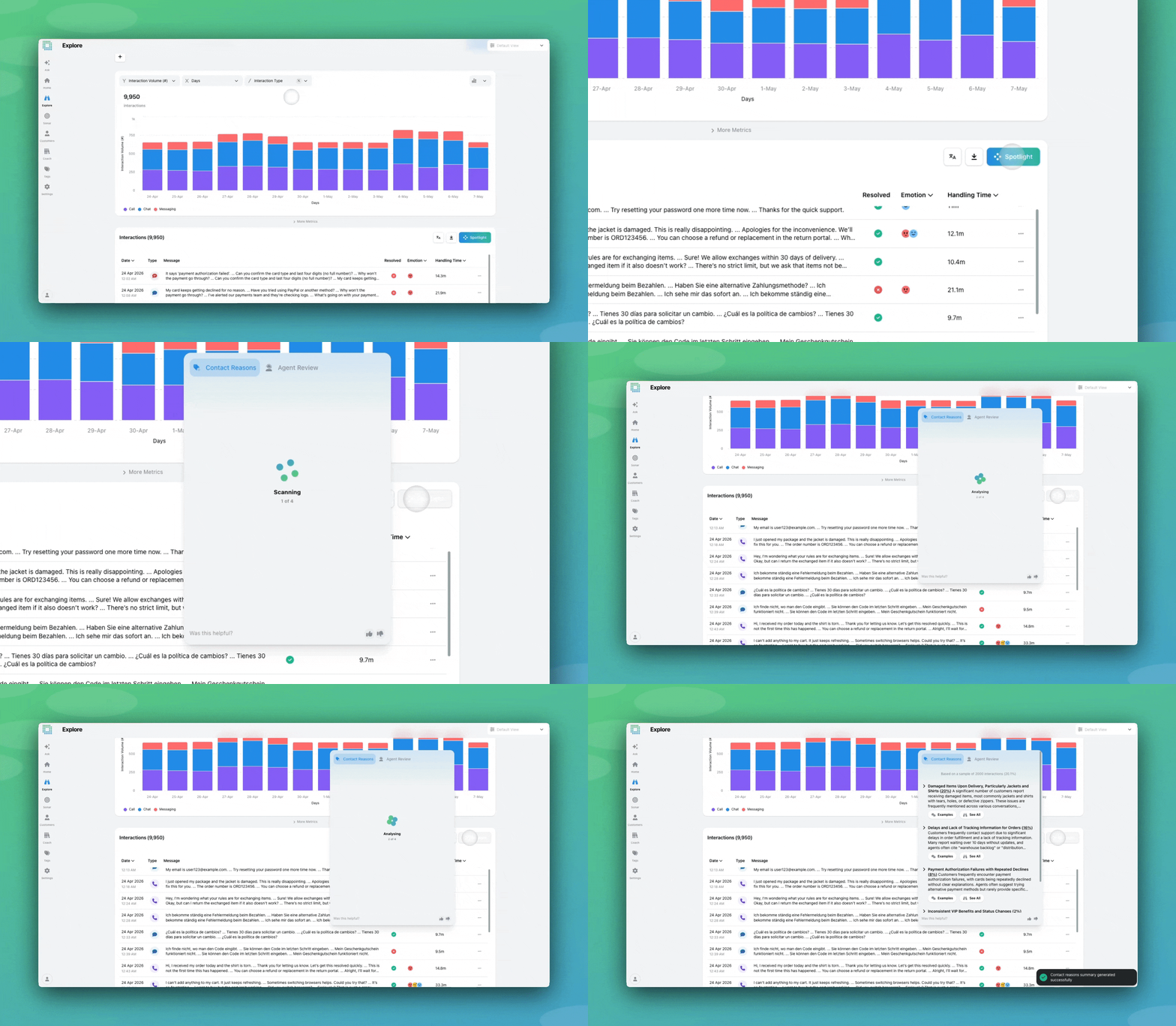
What is it? Three significant upgrades to Spotlight Summaries, EdgeTier’s AI summarisation feature. You can now see the actual interactions behind any Spotlight theme, drill into subtopics directly from the summary, and get an AI-generated view of how your agents are performing across a set of conversations, not just what customers are contacting about, but how well the team is handling it.
Why does this matter? Spotlight Summaries has always been good at surfacing the “what” – the themes, the trends, the recurring issues. This update gives you the “why” and the “how”. Instead of taking an AI summary at face value, you can now click straight into the interactions behind it, validate the trend yourself, and explore the data further without losing your place. Run a custom chart on the subset. Spotlight the Spotlight. Export for reporting. The summary is now a starting point, not a full stop.
The Agent Review tab takes this further for QA and coaching use cases. Filter Explore by a contact reason, open Spotlight, and flip to Agent Review; you’ll see recurring strengths and coaching opportunities across that specific cluster of interactions. It’s the kind of targeted coaching insight that used to take hours to pull together manually.
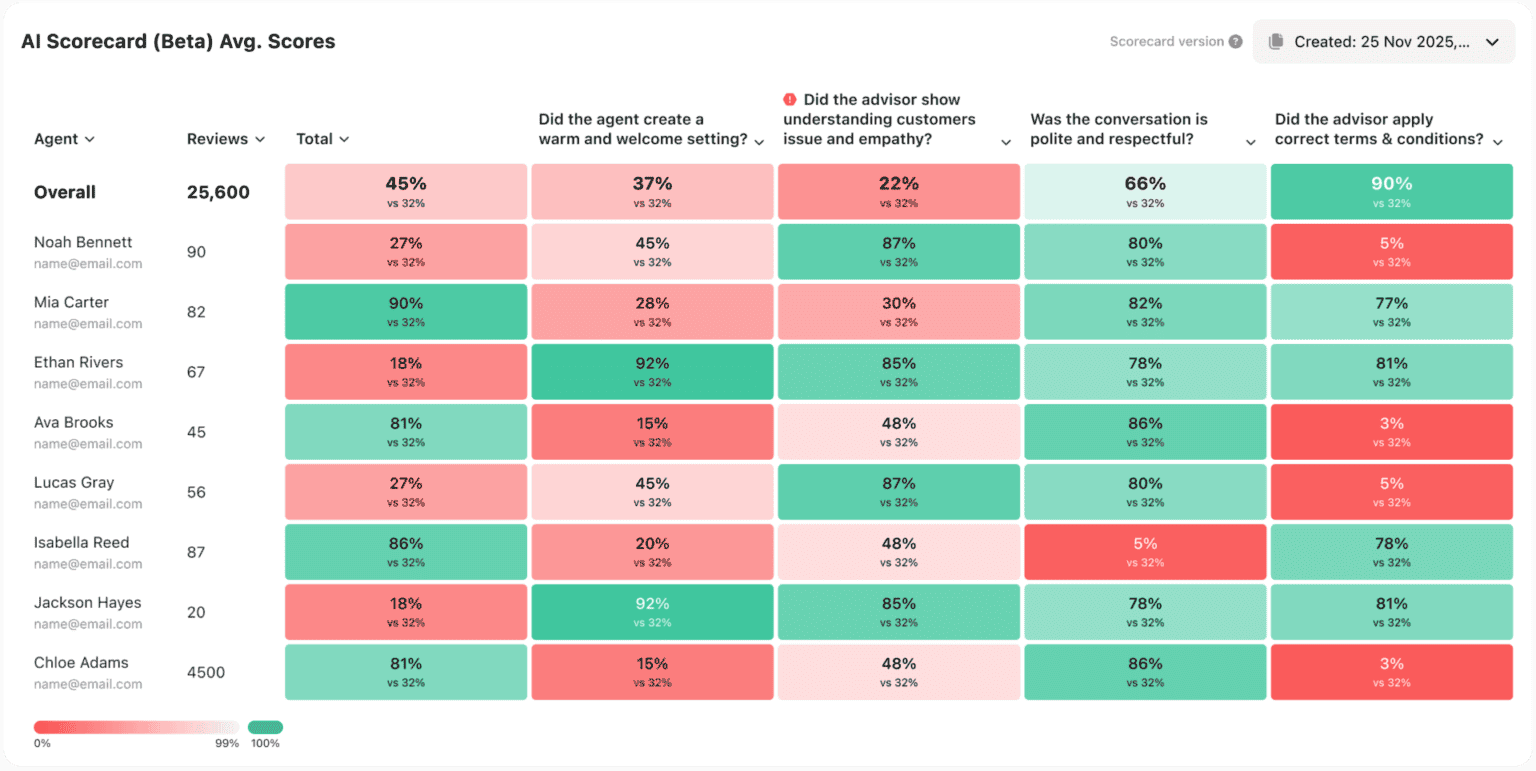
What is it? QA managers, team leaders, and agents can now see scorecard performance broken down by individual question, directly on the Agent Activity and Agent Log-In screens. A new heatmap shows pass rates per question at a glance, colour-coded so it’s immediately obvious where an agent is consistently strong and where they’re falling short; no custom reports, no manual filtering.
Why does this matter? An overall pass rate tells you something went wrong. It doesn’t tell you what. Knowing that an agent passes 80% of reviews is useful; knowing they consistently fail the GDPR check question is actionable. That’s the difference this update makes. For QA leads, the heatmap turns a coaching conversation from general to specific. For managers, it creates a feedback loop so you can run a targeted empathy session, check the heatmap the following month, and see whether scores on that question have actually moved. For agents, the self-view means they’re no longer going into a review conversation blind. They can see exactly which questions they struggle with before you’ve said a word.
What is it? A new heatmap on the Reviews screen in Coach gives you a team-wide view of scorecard performance, broken down by individual question. Every agent is a row, every scorecard question is a column, and every cell is colour-coded from green to red based on pass rate. Hover for period-on-period comparisons. Click any cell to filter the reviews table below it to exactly those results.
Why does this matter? Individual review scores tell you how one agent did on one conversation. The heatmap tells you something more useful: whether a problem belongs to a person or a process. If one agent is consistently failing the GDPR check question, that’s a coaching conversation. If three agents are all failing the same Call Opening question, that’s a training gap, and no amount of individual coaching will fix it. The heatmap makes that distinction visible in seconds. Questions marked as auto-fail are flagged in the header, keeping compliance-critical items front of mind. And because clicking a cell filters the reviews table directly, you can go from spotting a pattern to reading the actual interactions behind it without rebuilding your filters or changing screens.
For QA managers trying to prioritise a coaching backlog, this changes the starting point entirely.
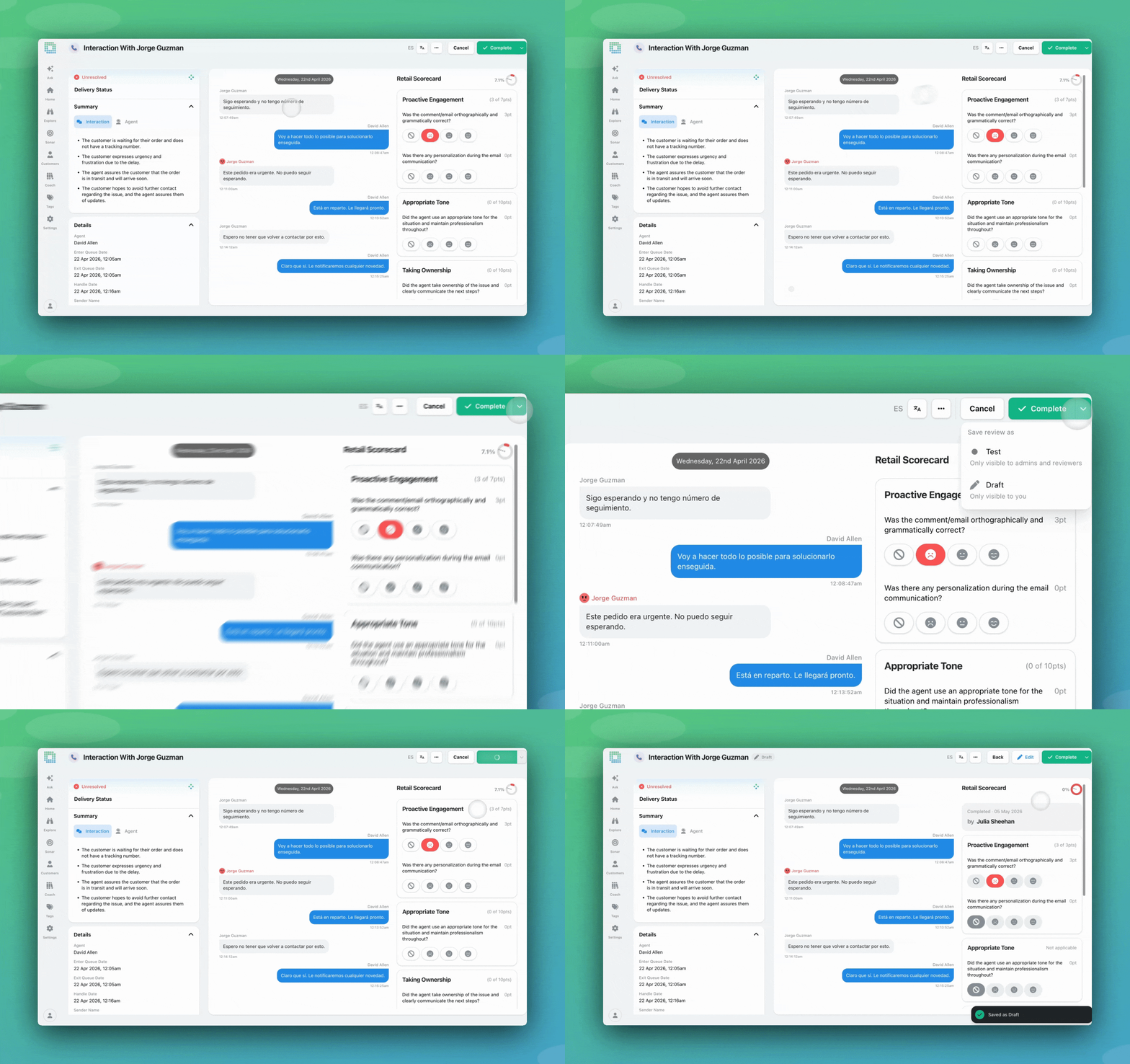
What is it? Three improvements to the Reviews workflow, shipped together. First, reviews now have proper status controls: save a review as a Draft while you’re working on it, mark it as Test for calibration purposes, or finalise it as Completed when it’s ready for the agent to see. Second, a seen/unseen indicator lets reviewers and QA managers see at a glance whether an agent has opened their feedback. Third, you can now export your full reviews table as a CSV, including question-level scores, reviewer comments, metrics, tags, and interaction content — directly from the Reviews screen.
Why does this matter? Until now, a review was either sent or not sent. That created real friction: reviewers couldn’t pause mid-review without the agent seeing incomplete feedback, QA teams couldn’t run calibration sessions without skewing agent metrics, and there was no way to know whether feedback had actually been read. Anything beyond the basics happened outside EdgeTier entirely.
These three updates close those gaps. Draft reviews mean unfinished feedback stays private until it’s ready. Multiple reviewers can score the same interaction independently, compare results side-by-side, and promote the agreed review to Completed when done – the agent is unaffected throughout. The seen/unseen toggle means you’re not chasing agents about feedback they’ve already read. And CSV export means review data can finally travel beyond EdgeTier into management reports, calibration sessions, and wider team conversations without manual effort.
What is it? EdgeTier now has an MCP (Model Context Protocol) server, meaning you can connect your AI assistant like Claude, ChatGPT, or any MCP-compatible tool, directly to your EdgeTier data. Once connected, you can ask questions, pull metrics, analyse themes, and surface anomalies through natural language, inside whatever AI tool your team already uses.
Why does this matter? EdgeTier captures what’s happening in your contact centre in extraordinary detail; every conversation, every frustration signal, every spike in volume, every agent scorecard. That data has always been there. The MCP server makes it directly accessible to the AI tools you’re already using. The questions that used to need a report, a data export, or a meeting now have answers in seconds, and because MCP supports multiple simultaneous connections, you can combine EdgeTier data with tools like Slack, Salesforce, Notion, or Linear and push insights directly into your existing workflows.
Ask Spotlight remains the right starting point for most EdgeTier users (no setup required, just ask a question and get an answer inside the platform!) The MCP server is for teams who want to go a bit further, bringing EdgeTier into their own AI environments on their own terms.

What is it? Useful answers from Ask Spotlight can now be shared with anyone on your team in one click. A new Share icon appears at the end of every response; click it, give it a title, choose whether to share just that response or the full conversation behind it, and you’ll get a persistent link that any EdgeTier user can open. Links don’t expire, and each session shows when it has active shares so you can see what’s already out there.
Why does this matter? Ask Spotlight launched this quarter as a way to get answers out of your data fast. Link sharing closes the obvious next gap: what do you do with a good answer once you have it? Until now, useful outputs stayed inside one person’s session. A manager investigating a spike in cancellations would have to screenshot their findings, copy out the reasoning, or just describe what they found, the work was done, but the insight didn’t travel easily.
Now it does. Share a daily performance summary into your team channel every morning. Hand off a full investigation thread to the agent who’ll action it, reasoning included. Keep a library of useful Ask Spotlight outputs that colleagues can access directly, without having to replicate the question themselves.
What is it? The Coach Reviews heatmap now has a toggle between Agent view and Reviewer view. Agent mode works exactly as before: average scores received per agent, broken down by question. Switch to Reviewer mode and the heatmap flips to show average scores given per question by each reviewer. Same date filters, same scorecard selection, same colour scaling, just a different lens on the data.
Why does this matter? Calibration only works if you can see where reviewers are diverging. Until now, spotting that one reviewer consistently scores 15% lower on the Tone question, or that two reviewers are interpreting the same question completely differently, required a custom export and manual cross-referencing. It was the kind of thing that only surfaced in a post-incident review, if at all.
Reviewer mode makes it a ten-second check. Open the heatmap, switch the toggle, and the patterns are right there. For QA leads running regular calibration sessions, it turns what used to be a preparation exercise into something you can walk the team through live.
What is it? Agents can now formally request a revision on any completed review they disagree with. They submit a written reason, the reviewer or a QA manager responds, either upholding the original scores or making changes, and the outcome is visible to the agent within EdgeTier. Whether revision requests are enabled is configurable per scorecard, so QA leads can roll this out selectively.
Why does this matter? Before this, if an agent disagreed with a review, that conversation happened outside the system with a message, a side conversation, or an email. There was no audit trail and no way to track whether disputes were being handled consistently or at all.
Revision requests bring that workflow inside EdgeTier. Agents have a legitimate, structured channel to flag inaccurate feedback. Reviewers have a clear queue to work through. QA leads can filter by revision request status to make sure nothing gets lost. And because the full history – the original review, the agent’s reasoning, the response, any score changes – stays on the record, there’s accountability on both sides.
Nine updates, all built around the same idea: less time hunting for answers, more time acting on them. Whether you’re a QA lead trying to understand where your team’s scoring is drifting, an analyst who used to wait days for data, or a contact centre manager who needs the full picture fast, Q2 was built for you!
We’re always iterating with your feedback in mind. If any of these updates spark questions or ideas, reach out to your Customer Success Manager.
Q3 is already taking shape with more Ask Spotlight features, AutoQA, and so much on top of this! Stay tuned!
Keep in touch with EdgeTier. Sign up for Bart’s newsletter and follow our LinkedIn.
Most of what we hear on customer calls is useful. Some of it is just lovely. We've rounded up the
From self-serve Sonar anomaly models to a smarter, shareable Ask Spotlight and a fully transparent QA dispute process, here's everything
EdgeTier turns your customer conversations into a single connected system: it catches anomalies before they escalate, scores every agent interaction


Debbie Duggan
Contract Manager for Customer Solutions
"We thought at the time that we were putting the customer at the fore. We thought we were doing things right. But in hindsight, we really weren’t because we had no real-time insights whatsoever into customer issues."


James Waghorn
Director of Customer Contact
"EdgeTier is no ordinary software product... It has completely changed how we work at CarTrawler."


Giovane Nicolau Junior
Head of Operations Performance
"EdgeTier is really shining when it comes to responsible gambling. We can proactively track critical issues and take actions, reducing human error."



Let us help your company go from reactive to proactive customer support.
Unlock AI Insights