Overheard at EdgeTier
Most of what we hear on customer calls is useful. Some of it is just lovely. We've rounded up the
Every quarter, our team ships features designed to make your day-to-day work a little smoother, a little faster, and a little clearer. This quarter was no different. From smarter ways to review calls to more transparency into how AI is working for you, here's a look at what's new in EdgeTier. 1. AI Analysis Improvements:…

Every quarter, our team ships features designed to make your day-to-day work a little smoother, a little faster, and a little clearer. This quarter was no different. From smarter ways to review calls to more transparency into how AI is working for you, here’s a look at what’s new in EdgeTier.
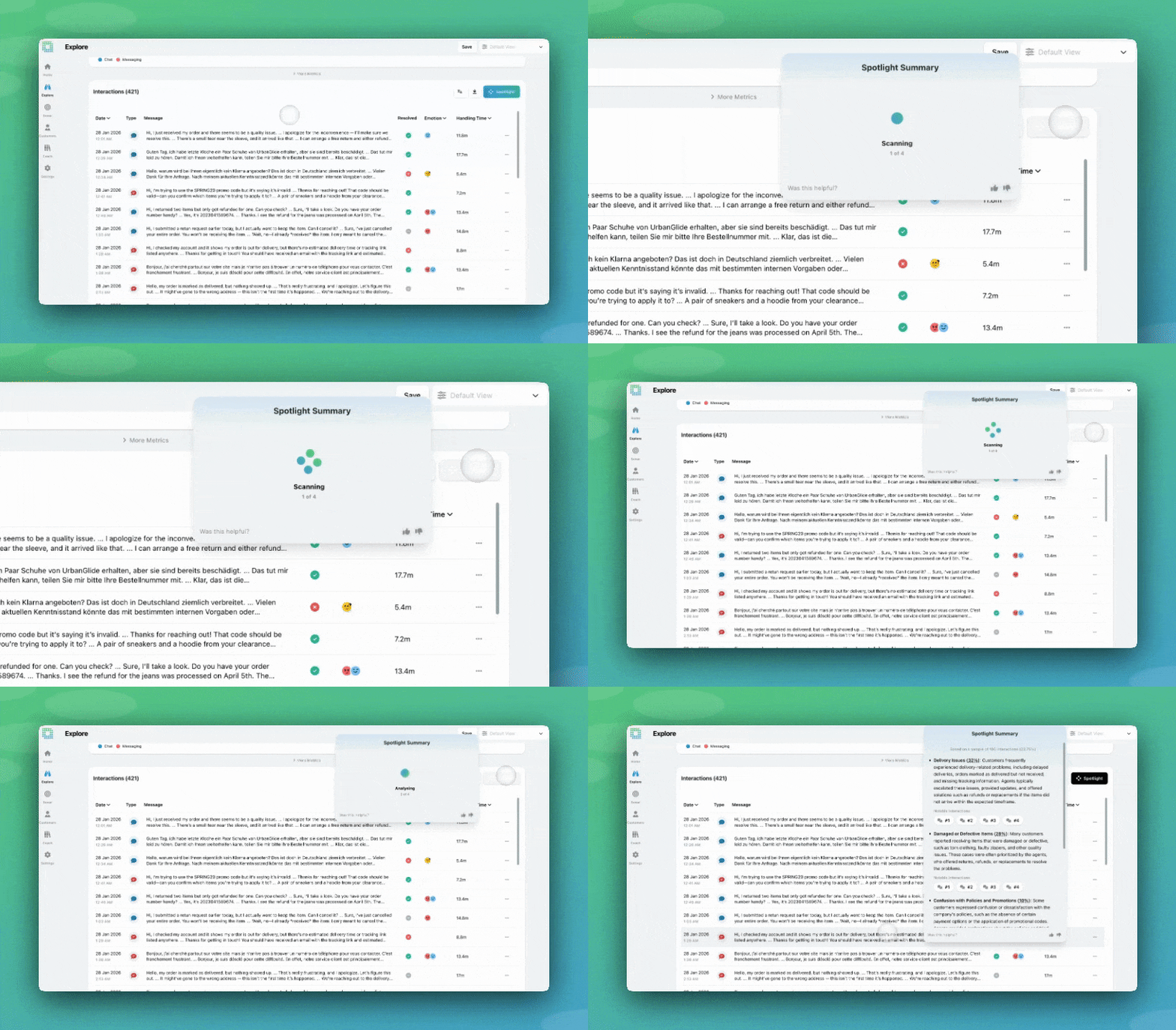
What is it? Spotlight, the AI feature that analyses multiple conversations at once to surface recurring themes, agent trends, and customer frustrations can now analyse up to 2,000 interactions per run, up from around 100.
Why does this matter? The Spotlight increase is significant. A sample of 100 interactions gives you a snapshot; a sample of 1,500–2,000 gives you something much closer to the full picture. You’re now far less likely to miss an emerging trend or have your results skewed by a small, unrepresentative sample. We’ve also improved the prompts behind Spotlight to surface richer root-cause insights, particularly when you’re analysing a focused subset of interactions like a spike or specific topic.
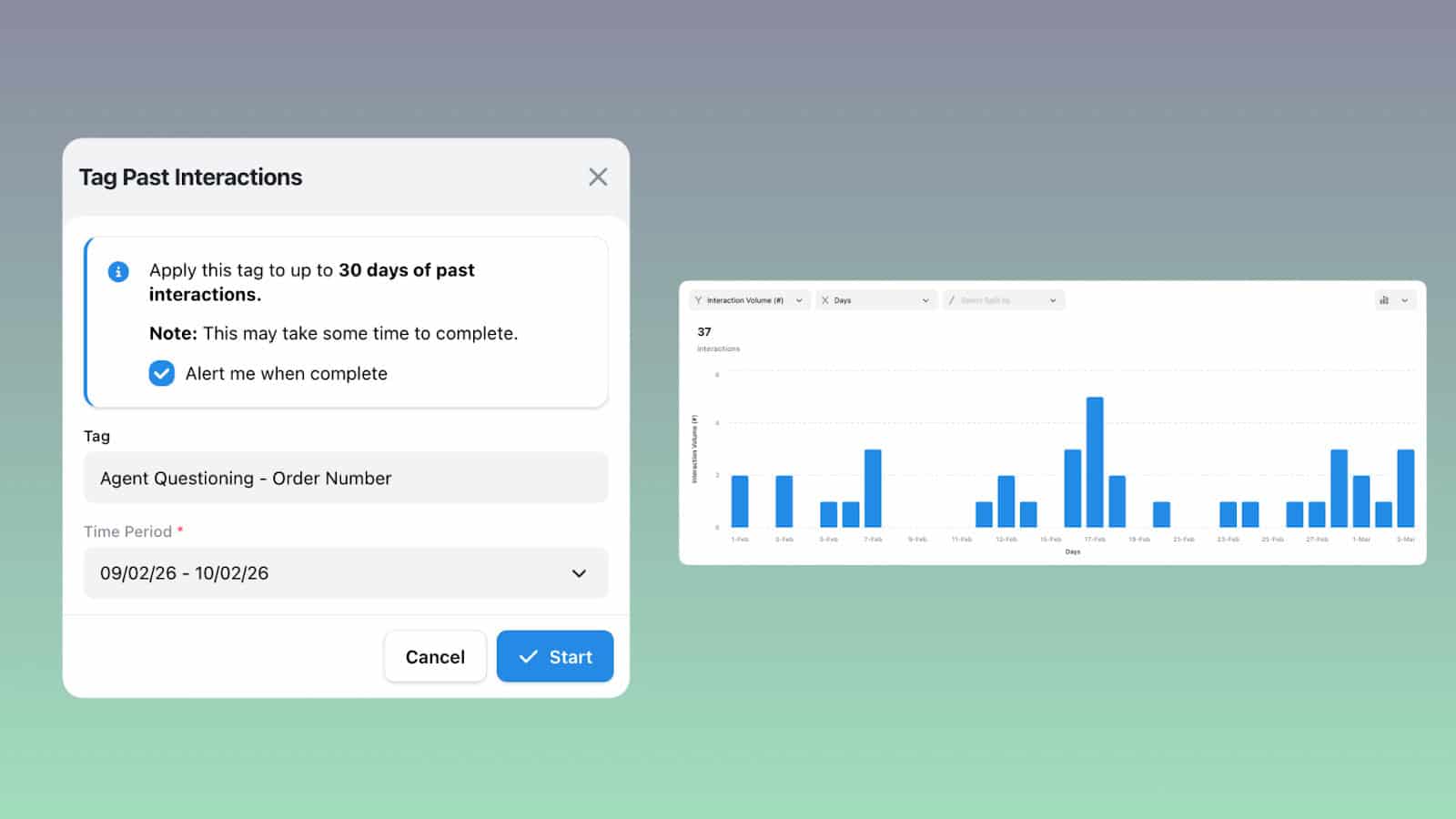
What is it? Previously, when you created or updated a phrase tag, it would only apply to new interactions going forward. Now, you can backfill tags against up to 30 days of historical interactions, either for a single tag or a whole group at once.
Why does this matter? Imagine you’ve just created a new tag to track a common complaint, or you’ve tightened the trigger wording on an existing one. Instead of having to wait for enough new interactions to come in to know if your setup was working, you can now validate it immediately against real historical data. It’s also a game-changer when something goes wrong; if an incident started last week, you can quickly capture all related interactions and get the full picture fast!
What is it? EdgeTier’s AI tagging automatically categorises every interaction by Contact Reason, no manual triggers needed thanks to a new dedicated AI Tags interface inside the EdgeTier platform.
Why does this matter? Visibility builds confidence. When you can see exactly how each of your Contact Reason tags is defined, what kinds of interactions it’s capturing, and how it’s performing over time, you can trust the data a lot more. The new interface also includes an Undefined Topics tab, so you can quickly spot whether your tags are covering your interactions well or whether a chunk is falling through the cracks.
This is just the first step; the ability to edit and test your own AI tag prompts directly in the platform is coming soon!
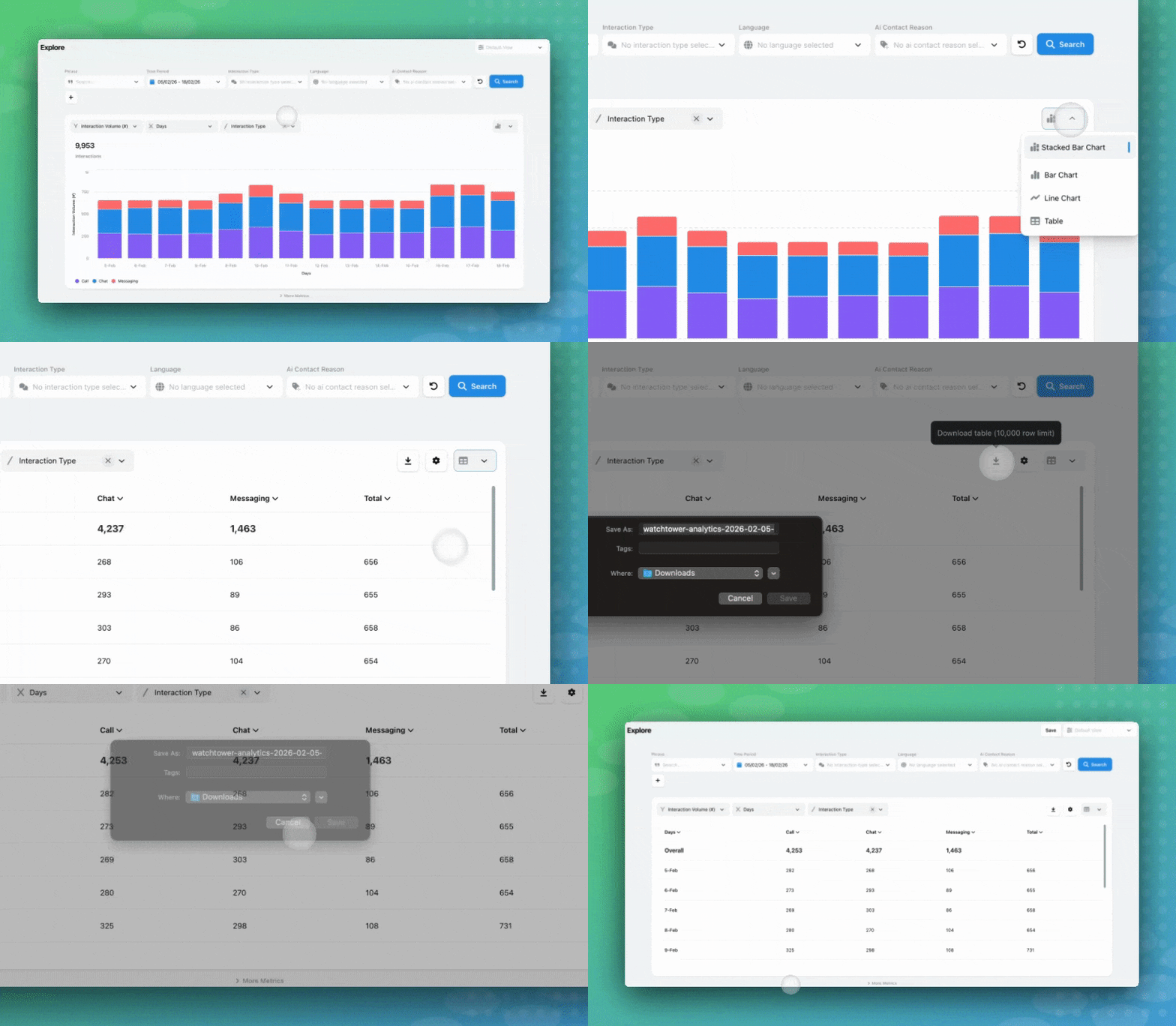
What is it? The Custom Chart in EdgeTier’s Explore screen is a great way to visualise your interaction data. We’ve now added a table view alongside the chart, which you can export directly to CSV.
Why does this matter? Sometimes you need your data in a format you can drop straight into a management report or share with a wider team. With one click, you can generate a clean, exportable table of exactly the data you’ve been exploring. And while the chart is limited to showing your top 10 categories, the table view bumps that cap up to 250, so you get a much more detailed breakdown without having to jump through hoops. Whether you’re tracking interaction volumes by agent or reviewing trends over a specific date range, getting that data out of EdgeTier and into the hands of decision-makers just got a lot easier. Note: Export limits have also been increased to 65,000 rows, and the CSV format now replicates the table view in EdgeTier exactly.
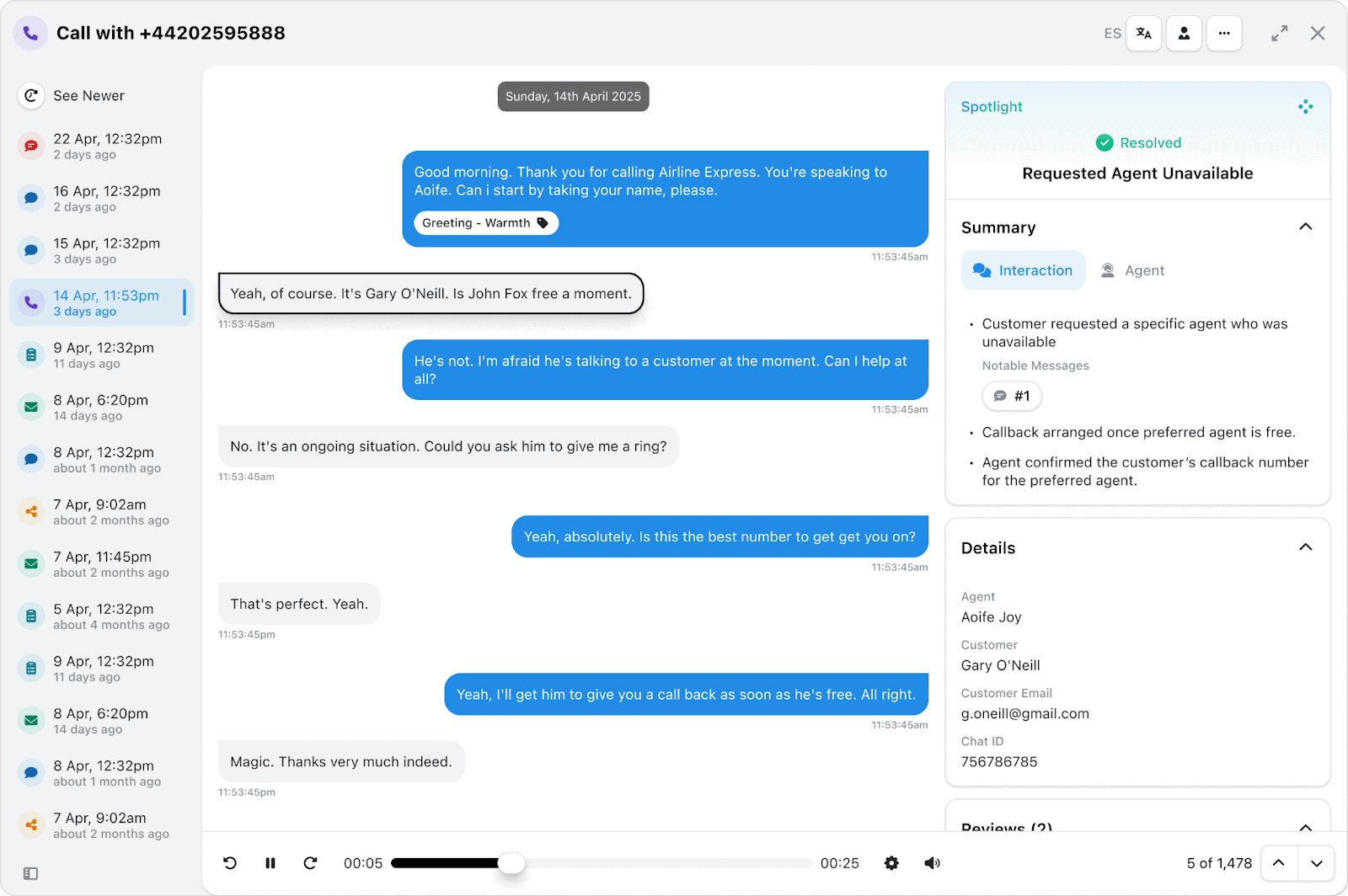
What is it? When you play a call recording in EdgeTier, the transcript now highlights in real time as the conversation unfolds. You can also click on any part of the transcript to jump the recording straight to that moment.
Why does this matter? Anyone who’s spent time reviewing calls knows the pain of scrubbing through audio trying to find one specific moment! Synchronised transcripts remove that friction entirely. Whether you’re doing QA, coaching an agent, or investigating a complaint, you can navigate directly to the moments that matter, no more guesswork.
What is it? A new emotion navigation toolbar now appears when you’re reviewing an interaction. You can jump straight to the first detected emotion in a conversation, or drill into a specific emotion (like frustration) and step through every occurrence one by one.
Why does this matter? For QA leads and coaches, finding emotionally charged moments in a long interaction used to mean reading or listening through the whole thing. Now you can go straight to the frustration, the confusion, or whatever you’re looking for in seconds. Messages are highlighted as you navigate, arrows let you step through each occurrence, and your recording playback is never interrupted. It’s a small UX change with a big impact on how quickly you can do meaningful quality work.
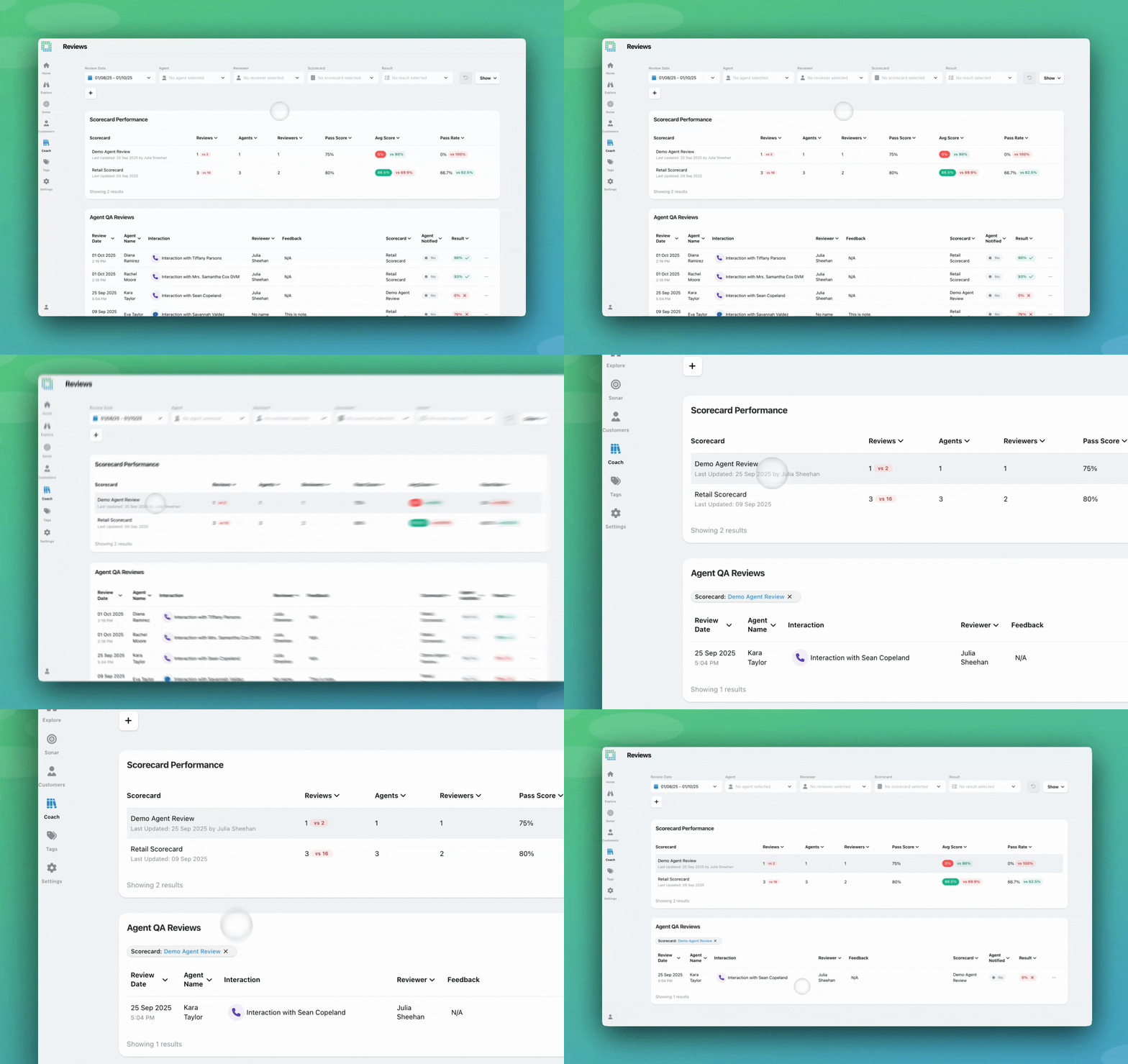
What is it? The Reviews screen in Coach now includes a Scorecard Performance table, giving you a clear breakdown of your review metrics by scorecard. At a glance you can see the number of reviews completed, agent and reviewer counts, passing score thresholds, average scores, and pass rates, all compared against the previous period so you can spot trends instantly.
Why does this matter? If you’re managing quality across multiple scorecards or channels, it’s been hard to know at a glance where performance is strong and where it needs attention. This table puts all of that in one place. Select any scorecard row to instantly filter the reviews list below it making it much faster to drill into the results that need your focus, whether that’s a specific team, channel, or use case.
What is it? Spotlight, EdgeTier’s LLM summarisation feature, already makes it easy to identify trends across large volumes of customer conversations. You can now go a step further, clicking into any Spotlight theme reveals the individual interactions behind it. From there, you can browse through examples quickly using your keyboard, filter your Explore view to show only those interactions, run a Custom Chart to visualise the breakdown, or Spotlight the subset again to go even deeper.
Why does this matter? Spotlight is powerful, but until now it’s been tricky to interrogate why a theme appeared. This update gives you full transparency into the interactions behind each AI summary, so you can move from a high-level trend to the granular detail in just a few clicks. Whether you’re investigating a spike in a particular complaint type or trying to understand the nuance behind an agent performance trend, you no longer have to take the summary at face value, you can dig straight into the data behind it.
Eight new features, all built around the same idea: giving you faster access to the insights that matter, with less noise in between. We’re always building with your feedback in mind, so if any of these updates spark questions or ideas, reach out to your Customer Success manager; we’d love to hear from you. Want to know more? Join our Product Webinar on April 15th – click HERE to register!
Q2 is on the horizon, look out for:
Keep in-touch with EdgeTier. Sign up for Bart’s newsletter and follow our LinkedIn
Most of what we hear on customer calls is useful. Some of it is just lovely. We've rounded up the
From self-serve Sonar anomaly models to a smarter, shareable Ask Spotlight and a fully transparent QA dispute process, here's everything
EdgeTier turns your customer conversations into a single connected system: it catches anomalies before they escalate, scores every agent interaction


Deborah Guivisdalsky
COO
"We now have highly detailed understanding of agent performance, not just on key agent metrics, but also on how customers react to our agents and the emotions of our customers feel when talking to our team."


Giovane Nicolau Junior
Head of Operations Performance
"EdgeTier is really shining when it comes to responsible gambling. We can proactively track critical issues and take actions, reducing human error."


Nick Brazitis
Global Customer Care Manager
"The anomaly feature is a game changer for us. It’s highly accurate and has helped us identify customer issues, agent errors, and even fraud that would have taken us longer to catch."



Let us help your company go from reactive to proactive customer support.
Unlock AI Insights