Opens in a new tab

Small Changes, Less Friction: Clearer Anomalies, Named Tabs and Phrase Search Experience

This update brings together a set of smaller improvements, all based on feedback from people who use EdgeTier every day. Anomaly pages now show more metrics and give interaction summaries room to breathe, browser tabs tell you which page you're on, and phrase search in Explore no longer loses what you've typed.
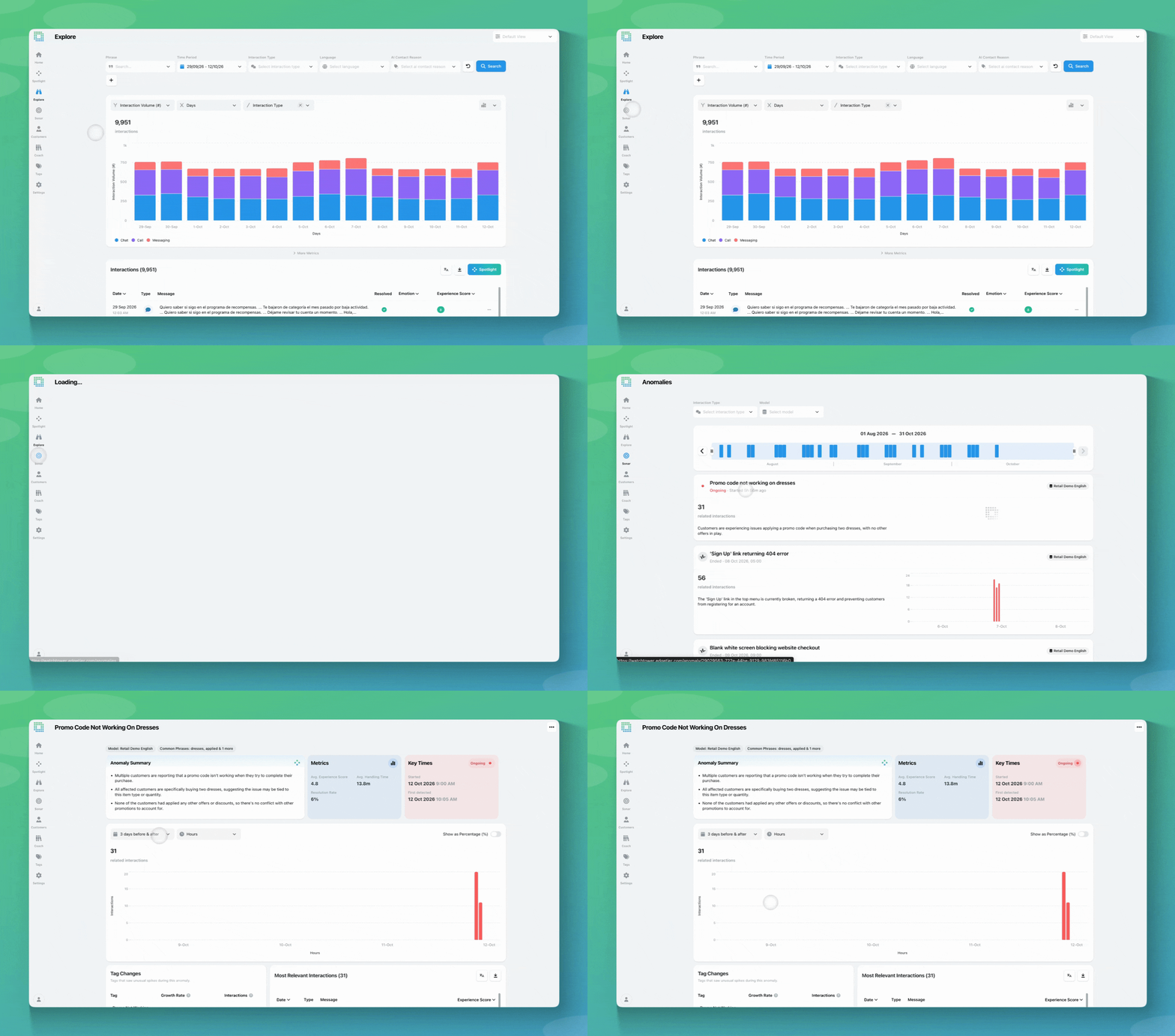
This update brings together a set of smaller improvements, all based on feedback from people who use EdgeTier every day. Anomaly pages now show more metrics and give interaction summaries room to breathe, browser tabs tell you which page you’re on, and phrase search in Explore no longer loses what you’ve typed.

1. Anomaly pages: more metrics and readable summaries

Small Changes, Less Friction: Clearer Anomalies, Named Tabs and Phrase Search Experience

What’s new

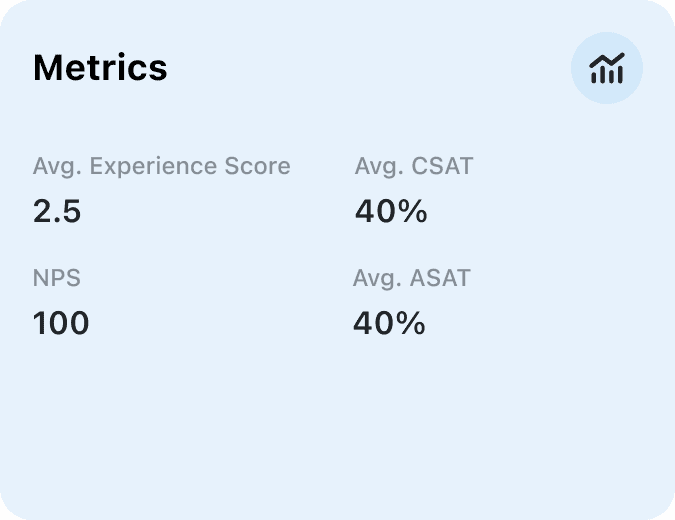
  • Metrics card. When you open an anomaly, the Metrics card shows the average scores for the interactions in that anomaly. It shows up to six metrics, in this order: Experience Score, CSAT, NPS, ASAT, Avg Handling Time, Avg Queue Time and Resolution Rate. Only metrics with a value appear, so if your account doesn’t collect CSAT or NPS you’ll see Experience Score, Avg Handling Time, Avg Queue Time and Resolution Rate instead.
  • Most Relevant Interactions table. The Resolved and Emotion columns have been removed from this table, giving the Message column more space. Interaction summaries are no longer cut short, so you can scan what’s happening without opening each interaction. The metric column (for example Experience Score or Handling Time) stays where it is.

Where to find it

  1. Open Sonar in the left-hand navigation and go to Anomalies.
  2. Click any anomaly to open it.
  3. The Metrics card shows the averages for that anomaly. Most Relevant Interactions is further down the page.

There’s no new permission for this. Anyone with the View Anomalies permission can see it.


2. Browser tabs named after the page you’re on

What’s new

Every EdgeTier tab used to read “WatchTower by EdgeTier”, whichever page was open. Each browser tab now shows the page you’re on followed by EdgeTier, for example Explore | EdgeTier or Reviews | EdgeTier.

Where to find it

  1. Open any page in EdgeTier as usual.
  2. Look at the tab at the top of your browser. It shows the page name, for example Agent Activity | EdgeTier.

There’s nothing to turn on and no permission involved. It applies to every page you can already open.


3. Phrase search in Explore keeps what you type

What’s new

Before, if you closed the phrase search window without clicking Done, for example by clicking outside it, everything you’d typed was lost. Now your search is kept:

  • Clicking outside the window, or clicking the filter again, applies your search just as Done would.
  • Pressing Escape closes the window without applying anything, and your text is still there when you reopen it.
  • Reset is now the way to clear your search. The Close button has been removed, and Reset sits beside Done.

Where to find it

  1. Open Explore.
  2. Open the phrase search filter and type your search.
  3. Click Done, or simply click outside the window, to apply it.

There’s no new permission for this. Anyone who can use phrase search in Explore will see the change.


What this looks like in practice

  • A CX lead looking at a spike in Sonar sees CSAT for the anomaly’s interactions next to Experience Score, and can judge how much it’s affecting customers before reading a single conversation.
  • A contact centre manager reads the full summaries in Most Relevant Interactions to understand what customers are saying about a spike, without opening each one.
  • A QA lead with Reviews, Explore and Agent Activity open in separate tabs goes straight to the one they need instead of clicking through each.
  • A CX analyst building a detailed phrase search clicks away from the window by accident, and the search is applied instead of having to be typed out again.

A few things worth knowing

  • If an anomaly has no scores at all, the Metrics card shows “No scores for this anomaly”.
  • The table change only applies to the anomaly page. Interaction tables elsewhere are unchanged.
  • Tab names only change what you see in your browser. Nothing inside EdgeTier moves.
  • Clicking outside the phrase search window won’t apply a search that’s incomplete or that would change your selected time period. Use Done to check it, or Reset to start again.

If you have questions or feedback, reach out to your Customer Success contact.

Customer-Focused Leaders Trust EdgeTier

  • novibet

    "It has reduced the time for the quality assurance process as it provides clear data and a very robust direction on where to look and what matters the most."


  • Electric Ireland Logo

    "We thought at the time that we were putting the customer at the fore. We thought we were doing things right. But in hindsight, we really weren’t because we had no real-time insights whatsoever into customer issues."


  • EdgeTier Assets - Car Trawler Logo

    "EdgeTier is no ordinary software product... It has completely changed how we work at CarTrawler."


Employees avatar purple
Employees avatar yellow
Employees avatar blue

Ready to see results?

Let us help your company go from reactive to proactive customer support.

Unlock AI Insights