Overheard at EdgeTier
Most of what we hear on customer calls is useful. Some of it is just lovely. We've rounded up the
EdgeTier is now in Claude's connector directory. Connect it and your team can ask Claude about contact volumes, CSAT, sentiment and AutoQA results in plain language, with answers drawn from 100% of your customer conversations. See what you can ask, a worked example and how to get started.

EdgeTier is now available in Claude’s connector directory. Once it’s connected, anyone on your team who uses Claude can ask questions about your contact centre in plain language and get answers built from your real customer conversations.
Claude works from EdgeTier’s analysis of 100% of your customer conversations across Zendesk, Genesys, Salesforce and the other platforms you already use. It can also pull in information from your CRM, ticketing and messaging tools, so one question can combine what customers are saying with what’s happening in their accounts.
Getting an answer out of contact centre data usually means opening a dashboard, setting filters, exporting the results and building a report. With the connector, you type your question into Claude. It pulls the metrics, reads the conversations and analyses your live EdgeTier data to answer it.
Every answer can link back to the interactions, agents or anomalies it came from in EdgeTier, so you can check the source before you act on it.
Learn more: EdgeTier MCP
Just remember: for workflows involving other tools, such as Shopify, Slack or Notion, Claude also needs access to the relevant integrations.
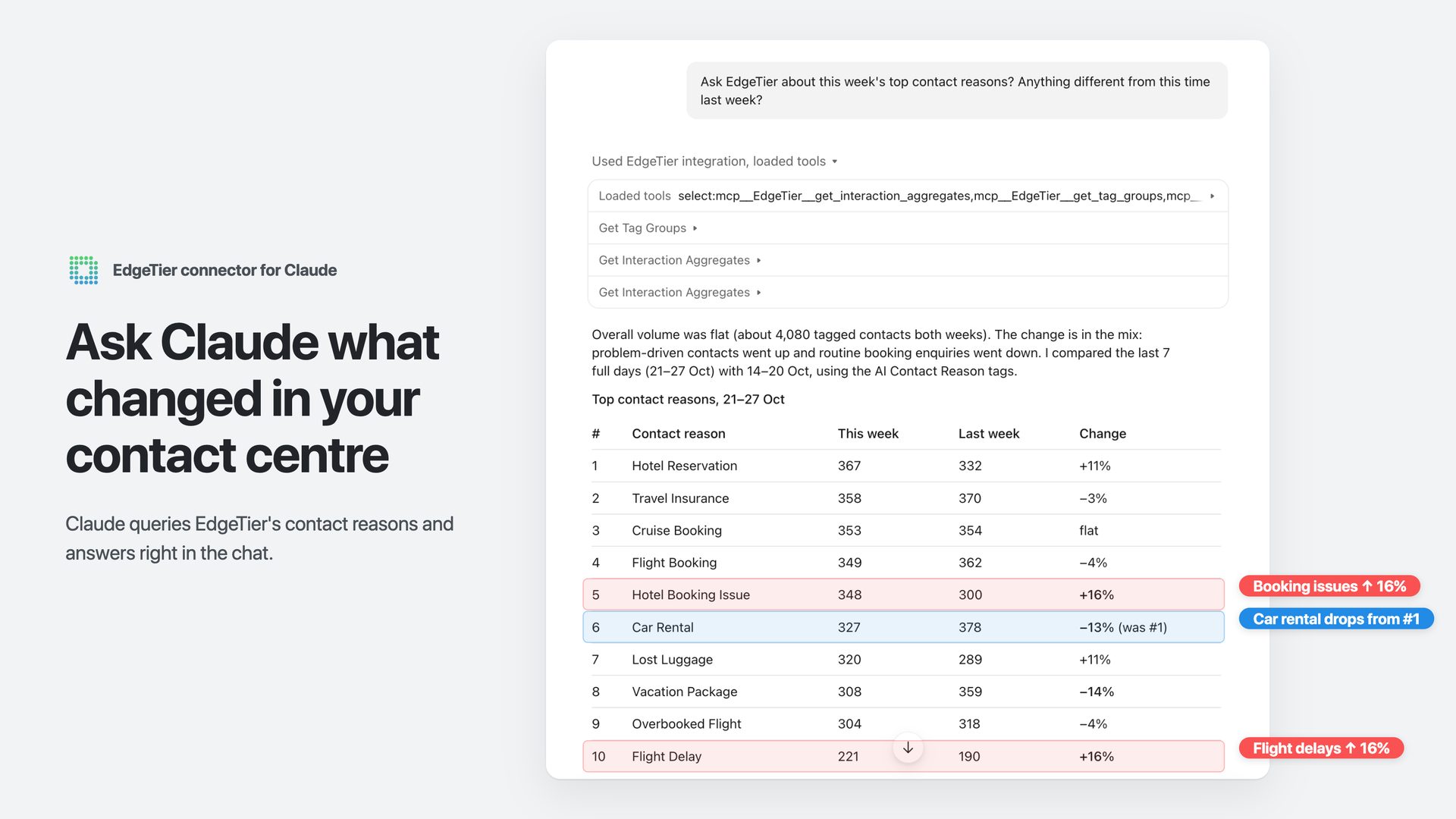
Let’s say a travel company’s customer service team wants to understand why certain types of customer enquiries are increasing.
The team starts by asking Claude for this week’s top contact reasons compared with last week.
Claude returns a table showing that contacts about email confirmations have increased by 77%.
The team follows up with a simple question: “What’s happening with email confirmations?“
Claude analyses the underlying conversations and discovers that confirmation emails are failing for more complex bookings, including multi-city flights, group tours and travel insurance. Simpler bookings appear to be working fine.
In just two questions, the team has gone from spotting a spike in contact volumes to identifying a specific problem they can investigate and fix.
No manual filtering, data exports or reports required.
You sign in using your existing EdgeTier account, and access is limited to your organisation and the permissions you already have in EdgeTier.
Claude can only access data you’re authorised to view.
The connector must first be enabled for your organisation, and your EdgeTier admin controls which roles are granted the Use MCP permission.
Setup takes three simple steps:
Our setup guide also covers Claude Desktop, Claude Code and other AI assistants that support MCP.
Not an EdgeTier customer yet? [Book a demo]
EdgeTier is an AI-powered contact centre analytics platform built for customer experience and customer service leaders at large enterprises. It analyses 100% of customer interactions across voice, chat and email, uncovering insights that help improve agent performance, customer satisfaction and operational efficiency.
EdgeTier is trusted by leading brands across travel, retail, financial services and insurance.
Most of what we hear on customer calls is useful. Some of it is just lovely. We've rounded up the
From self-serve Sonar anomaly models to a smarter, shareable Ask Spotlight and a fully transparent QA dispute process, here's everything
EdgeTier turns your customer conversations into a single connected system: it catches anomalies before they escalate, scores every agent interaction


Vladimir Greavu
BBG Director of Customer Service
"I specifically liked the flexibility. I liked the can-do attitude. I always felt supported. There hasn’t been any single point in our journey where EdgeTier has said no."


Debbie Duggan
Contract Manager for Customer Solutions
"We thought at the time that we were putting the customer at the fore. We thought we were doing things right. But in hindsight, we really weren’t because we had no real-time insights whatsoever into customer issues."


Nick Brazitis
Global Customer Care Manager
"The anomaly feature is a game changer for us. It’s highly accurate and has helped us identify customer issues, agent errors, and even fraud that would have taken us longer to catch."



Let us help your company go from reactive to proactive customer support.
Unlock AI Insights