
Coaching without the digging: Question-level scoring across reviews
You can now see how every scorecard question was scored across a review period, so you can spot knowledge gaps

EdgeTier's AI assigns a resolution status to every interaction , and now you can see exactly why.
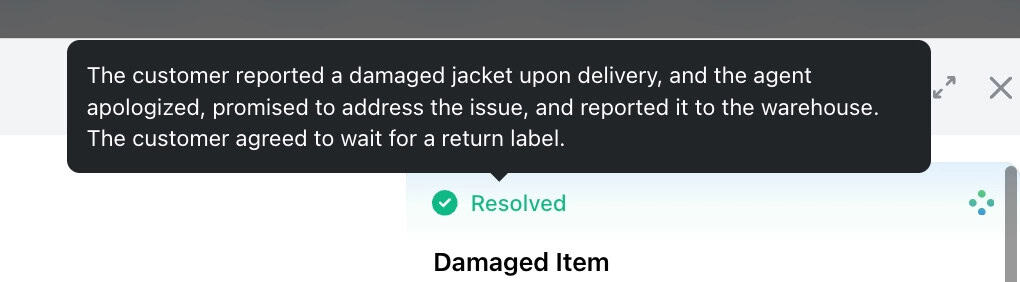
When you hover over the resolution status on an interaction, a tooltip appears explaining the logic behind the value assigned. Instead of seeing a result without context, you now get a clear explanation of why the AI determined an interaction was resolved or unresolved.
This gives contact centre managers and agents the transparency they need to understand, report on, and act on resolution data with confidence.
No settings or permissions required. The tooltip is available to all users who can view interaction details.
If you have questions or concerns, please reach out to your customer success contact.
You can now see how every scorecard question was scored across a review period, so you can spot knowledge gaps
Every agent who touches a conversation gets tracked against it now, and you can widen filtering and reporting to match,
You're now able to drop reusable variables into an Ask Spotlight prompt, so you don't have to retype the same


Quentin Bottner
Head of Continuous Improvement
"We’re a big business, so getting the right people to agree and fix something hasn’t always been easy. Now we’ve got one version of the truth—it’s much easier to align and act"


Deborah Guivisdalsky
COO
"We now have highly detailed understanding of agent performance, not just on key agent metrics, but also on how customers react to our agents and the emotions of our customers feel when talking to our team."


Nick Brazitis
Global Customer Care Manager
"The anomaly feature is a game changer for us. It’s highly accurate and has helped us identify customer issues, agent errors, and even fraud that would have taken us longer to catch."



Let us help your company go from reactive to proactive customer support.
Unlock AI Insights