
AI Analysis Improvements: Larger Spotlight sample size for broader insights & Experience Score change
We’ve shipped a set of improvements to Spotlight that significantly increase the number of conversations it can analyse in a

We’ve added presets to our Home, Frequent Customers, and Coach screens. Just like in our Explore screen , you will now be able to save your preferred set-up for dates and filters to immediately spot data that is useful to you as soon as you log-in, and switch between different data sets with ease.
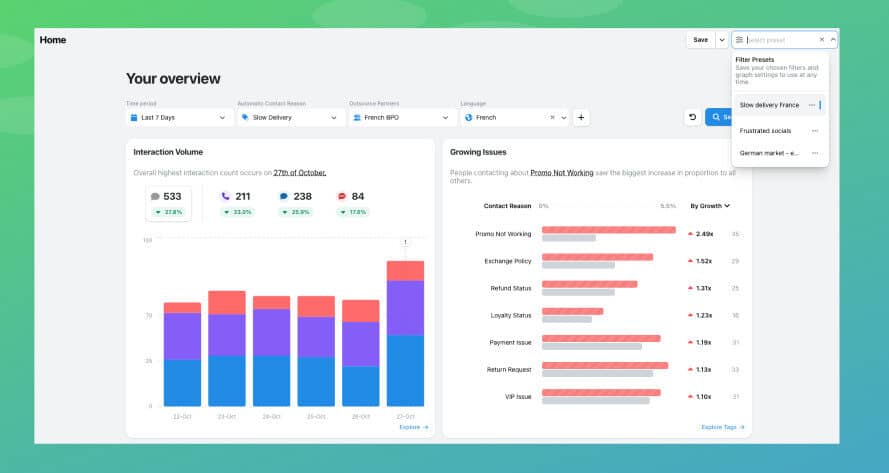
If you create and apply a preset on one screen, for example Explore, it will be applied across the platform. Each one you create is unique to your user account, so you can create as many as you’d like. You can share them by sharing a link to your page once the preset is applied.
Once you have, you’ll be able to use these to quickly assess what’s happening across your organisation. They are useful for quick views of areas you know are prone to issues, or you’re concerned about in a specific period of time.
With Presets now across WatchTower, you can spend even less time setting up filters and more time acting on insights. This feature is available to all WatchTower users.
We’ve shipped a set of improvements to Spotlight that significantly increase the number of conversations it can analyse in a
We've added some metric updates to our custom charts and agent screens, to provide you with even better insights into
We’ve added even more permissions-based features to enable a better AgentQA experience in WatchTower.


Nick Brazitis
Global Customer Care Manager
"The anomaly feature is a game changer for us. It’s highly accurate and has helped us identify customer issues, agent errors, and even fraud that would have taken us longer to catch."


James Waghorn
Director of Customer Contact
"EdgeTier is no ordinary software product... It has completely changed how we work at CarTrawler."


Giovane Nicolau Junior
Head of Operations Performance
"EdgeTier is really shining when it comes to responsible gambling. We can proactively track critical issues and take actions, reducing human error."



Let us help your company go from reactive to proactive customer support.
Unlock AI Insights