
New AgentQA Permissions: Expanded Agent Log-In and View all Reviews
We’ve added even more permissions-based features to enable a better AgentQA experience in WatchTower.

Strong Customer Emotions is a new widget on the Home screen that highlights the conversations where Frustration, Confusion, or Praise are most apparent – drawing your attention to the interactions with the strongest signals of customer emotion.

You can now use this AI-powered widget to get a quick look at hot points within your most emotionally charged conversations. This layout lets you instantly see what’s causing frustration or confusion without having to read the entire transcript. As a bonus, we’ve highlighted messages with Praise as well, to help you catch standout service and what’s landing well with customers.
Behind the scenes, our emotion analysis is the same as before. But we wanted to make it work harder and go a step further to amplify the voice of your customers, pinpointing the most critical ones to take action on.
Our AI-powered emotion detection is still tuned to analyse customer service data. It already replaces some manual efforts by intelligently recognising language patterns and looking for signals in customer interactions, sentence by sentence, and flagging those in the system with our Emotion icons.
However, in a 28-minute customer call tagged as frustrated, it was hard to find where the frustration was and what was causing it.
With our new Strong Customer Emotions section, we’re pulling out and highlighting some of these actual messages on the Home screen to reveal how people feel about your products, processes, or services today, yesterday, and the past week. You can use the filters at the top of the Home screen to narrow this further and see how people are feeling by brand, topic, language, market, etc.
This helps you spot recurring high-priority issues sooner, and gives you a clearer view of how your customers are feeling without reading entire transcripts to find the confused or frustrated sections.
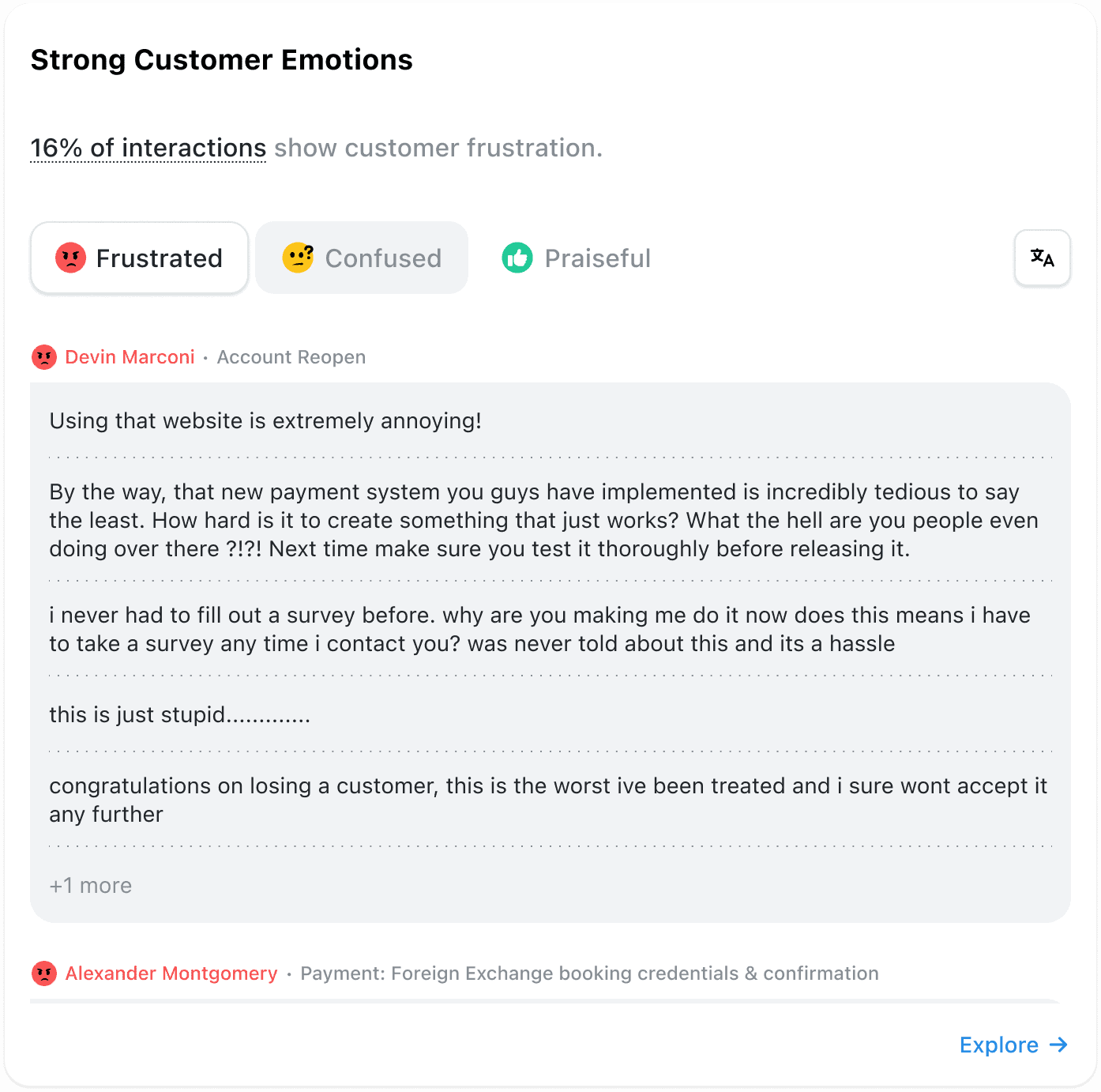
On the Home screen, the new Strong Customer Emotions feature is next to the Active Customers widget. Users with the existing View Customer Insights permission (which gives you access to the Customer Overview and Frequent Customers pages) will have immediate access from today.
To check which users in your organisation have access, go to Settings > Roles & Permissions and scroll down to View Customer Insights.
Please contact your Customer Success Manager if you have any questions about this feature.
We’ve added even more permissions-based features to enable a better AgentQA experience in WatchTower.
Alongside other interaction analytics, our platform now provides you with resolution tags, to see how well support interactions are being
You can now filter for AI generated reviews throughout the system—on the Explore screen, Reviews screen, Agents screen, and more,


Quentin Bottner
Head of Continuous Improvement
"We’re a big business, so getting the right people to agree and fix something hasn’t always been easy. Now we’ve got one version of the truth—it’s much easier to align and act"


Vladimir Greavu
BBG Director of Customer Service
"I specifically liked the flexibility. I liked the can-do attitude. I always felt supported. There hasn’t been any single point in our journey where EdgeTier has said no."


Robert Davies
Consultant
"You’ve got an issue, but you don’t know how many people are affected. You don’t know the scale. You don’t even know if it’s real."



Let us help your company go from reactive to proactive customer support.
Unlock AI Insights